Sa2web Quickstart and Practical Guide
Build your enterprise remote browser environment, from private deployment to team collaboration
What Is Sa2web?
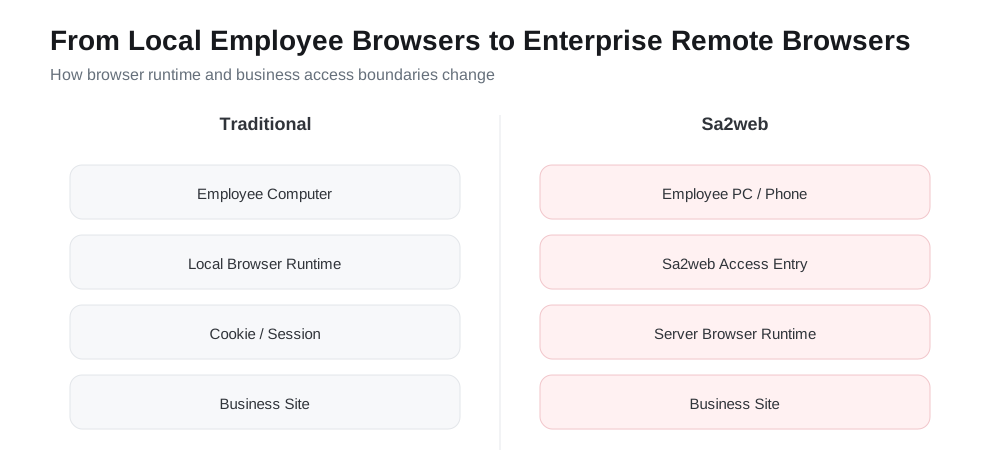
Sa2web is a remote browser platform for internal enterprise systems and business applications. You can also think of it as a “browser bastion host”. It does more than move a browser to the cloud: it centralizes access entries, browser runtime environments, account sessions, permission policies, sensitive data protection, and audit records into a manageable workspace system.
In the traditional model, employees usually access SaaS products, business backends, or internal systems directly from local browsers. Accounts, cookies, sessions, page data, copy/download behavior, and operation traces are scattered across different devices. When employees join, transfer roles, leave, or when temporary access is granted to contractors, customers, or AI Agents, administrators struggle to control who can access what, which identity they use, what they can see, what they can copy or download, and how issues can be traced afterward. Sa2web is built to solve this kind of browser access governance problem.
With Sa2web, users still open pages through their own browsers, but the target site is actually accessed by a remote browser deployed in a controlled environment. Administrators can configure SaaS sites, inner sites, and workspaces as unified entries, then authorize resources to different users through groups, roles, and permissions. Target-site scripts, cookies, sessions, and account environments remain in remote workspaces, so endpoint devices do not need to retain sensitive access credentials long term.
What Can Sa2web Do?
This book focuses on the following capabilities:
| Capability | Problem Solved |
|---|---|
| Cloud Browser | Provides employees with controlled remote browser environments and reduces differences between local devices and scattered data |
| SaaS site access | Configures business or external website systems as unified entries, allowing administrators to pre-login accounts and authorize employees to use them without handing over account information directly |
| Workspace | Fixes a site account, browser configuration, and access environment; suitable for multiple accounts, stores, customers, and regions |
| Inner site access | Lets employees access intranet systems from a unified entry without exposing endpoint devices directly to the internal network |
| Collaboration link | Provides controllable, expirable, password-protected access links for customers, contractors, temporary users, or delivery scenarios |
| Users, groups, and permissions | Uses groups to manage combinations of users, sites, workspaces, inner sites, proxies, and feature permissions |
| Target URL protection | Hides or encrypts the real target URL to reduce exposure of origin addresses, internal paths, and business parameters; suitable for supplier systems or systems that must remain confidential |
| Watermarks and sensitive content controls | Centrally controls page display, copy, download, and sensitive fields |
| Recording and replay | Records key access processes for auditing, troubleshooting, training, and accountability |
| Site customization and scripts | Uses page scripts, interface scripts, page control rules, and related tools to adapt complex business pages, improve personalized interaction, and increase efficiency |
| MCP / AI access | Lets AI clients such as Codex, Claude Code, and Cursor operate remote browsers within permission boundaries |
Together, these capabilities form one main thread: turning “opening a web page” from a personal device action into a controlled enterprise access process that can be authorized, isolated, audited, and handed over.
What You Can Do After Reading This Book
After reading this book, you should be able to deploy a usable Sa2web environment from scratch and complete a common enterprise access governance loop:
- Install Sa2web on a Linux server and complete the basic configuration for license, machines, browsers, and certificates.
- Enable employees to access Cloud Browser, SaaS sites, inner sites, and workspaces.
- Use workspaces to manage multiple business accounts and fixed browser environments, avoiding account mixing and environment drift.
- Use collaboration links to safely grant limited access to temporary users, contractors, or customers.
- Build a basic authorization model with users, administrators, roles, groups, and permissions.
- Enable URL protection, watermarks, copy/download restrictions, sensitive word hiding, and page control hiding for sensitive sites.
- Enable recording and replay for critical business access to create reviewable operation evidence.
- Write scripts for complex sites to enhance pages, process interfaces, mask data, or assist automation.
- Configure Sa2web MCP so AI Agents can access business pages through controlled accounts and authorized scopes.
- Troubleshoot common deployment, access, certificate, permission, MCP, and Passkey issues.
In other words, the goal of this book is not merely to help you “install it successfully”. It is to help you build an enterprise remote browser access solution that is deliverable, manageable, diagnosable, and suitable for real team use.
How to Use This Book
This is a hands-on tutorial organized in the order you would normally use Sa2web.
If you are using Sa2web for the first time, complete Part 1 in order:
- Deploy Sa2web.
- Create a machine and a browser.
- Set up SaaS site access.
- Create collaboration links.
- Use workspaces to manage multiple accounts.
- Connect inner sites.
- Authorize access with groups, roles, and permissions.
After that, move on to advanced features such as target URL protection, watermarking, recording and replay, MCP, and site customization.
This book uses the official Sa2web Chinese documentation as its primary factual source, then reorganizes the material around the practical path of getting started from zero. When the product changes, always follow the official documentation and the actual UI for your version.
Six Objects to Know First
| Object | Role |
|---|---|
| User | Logs in to the user frontend and accesses sites, workspaces, and inner sites |
| Machine | Hosts the remote browser runtime environment |
| Browser instance | The browser runtime that actually accesses SaaS or inner sites |
| SaaS site | An external business site exposed to users |
| Inner site | An entry point to an internal enterprise system |
| Workspace | An access entry that fixes a site account, browser environment, and configuration |
In real enterprise authorization, groups usually combine users, sites, workspaces, inner sites, agents, and permissions.
Official documentation:
- https://www.sa2web.com/docs/en/concepts